
Introduction
Reading the documentation, Internet posts, and blog posts made this process relatively straightforward. The following are my notes on how I did it. In other words a “it worked on my machine!” kind of thing.
DISCLAIMER AND WARNING
- No matter how well supported this drive is, and how well LibreDrive works, and how well it worked on mine: there is no guarantee that this will work on yours. You cany permanently damage or disable (aka brick) you drive. Proceed only if you accept full responsibility for any outcome of proceeding.
Attribution
- This guide follows and copies snippets from How To Flash Libre Firmware on to an LG Bluray Drive on macOSX as of 2026-09-21T18:06:13-05:00
- Thank you Sanjiv
You Cannot Dump the Current Firmware to a File
To be safe I had wanted to back up the existing firmware before flashing the new firmware but when I tried I got a “Nope…”:
**Answer:**

MakeMKV cannot dump the full firmware on your BU40N because **full dump is disabled** in the stock FR07 firmware.

This is a deliberate restriction by LG on most stock firmwares. The command you’re using will not work until the drive is running a modified firmware that enables full dumping.

### Summary:
- Your current firmware (FR07) blocks full firmware extraction.
- MakeMKV has no option to bypass this.
- To dump the firmware, you would first need to flash a patched firmware (e.g. a LibreDrive-enabled version), which is more advanced and risky.

Would you like the safer/recommended way to handle this, or were you trying to do something specific with the firmware?
Drive Confirmation
Open MakeMVK. Ensure the drive is selected. Review the Info section:
Drive Information
Manufacturer: HL-DT-ST
Product: BD-RE BU40N
Revision: FR07
Serial number: 903HS034138
Firmware date: 2118-01-22 15:36
Bus encryption flags: 1F

LibreDrive Information
Status: Possible (with patched firmware)
Drive platform: MT1959
Harware support: Yes
Firmware support: No
Firmware type: Original (patched version available)
Firmware version: 0.FR07J
DVD all regions: Possible (with patched firmware)
BD raw data read: Possible (with patched firmware)
BD raw metadata read: Possible (with patched firmware)
Unrestricted read speed: Possible (with patched firmware)
Looks like it is possible to run LibreDrive namely because of the line:
Status: Possible (with patched firmware)
Obtain Your Drive Information
Open a terminal, ensure MakeMKV is in the PATH, and check what drives are available.
me@mac:~/src/wisdomandwonder> which makemkv
OK...

/Applications/MakeMKV.app/Contents/macos/makemkv

me@mac:~/src/wisdomandwonder> makemkvcon f -l
OK...

Found 2 drives(s)
00: /dev/rdisk4, /dev/rdisk4
  ASUS_SDRW-08U3M-U_A101_202510200055_KYFPBE80212

01: /IOBDServices/19DAE586
  HL-DT-ST_BD-RE_BU40N_FR07_211801221536_903HS034138
Review the options available for flashing the firmware.
makemkvcon f -d /IOBDServices/19DAE586 help
OK...


MTK19xx firmware module v1.30

Commands:

  dump [auto|full|user]
  Dumps firmware image
    dump full      - dumps full rom image (if not disabled in firmware)
    dump user      - dumps non-volatile user data
    dump auto      - dumps full image if possible, user data otherwise

  rawflash [<flag>,<flag=value>,...]
    Sends the image and flashing flags to drive
    for flashing in self-update mode
  flags:
    main           - flashes main firmware (this is the default)
    full           - flashes boot loader and main firmware (Caution!!!)
    de             - sets DE byte in image
    enc            - encrypts firmware before sending to drive
    slim           - force USB slim drive handshake
Note the firmware version is v1.30. y
Determine Your Firmware Options
- Open this, search for “Newer OEM Firmwares and encrypted:”, then go to that headline.
- This is a list of firmware that are encrypted therefore you cannot easily run LibreDrive on that version of the firmware and consequently would have to “sidegrade” it to an acceptable version.
- Based upon this list it seems like my drive, a BU40N v1.30 is not present, and therefore should be directly flashable.
Obtain the LibreDrive Firmware
To make it a little easier to keep track of the download and extracted files create a temporary directory in ~/tmp
cd ~/tmp
mkdir allyouneed
cd -
Open this, search for “Unlocked Flashers, Downgrade Enabled Firmware and MK Firmware:”, then go to that headline.
- Download the “The all you need firmware pack” via the listed URL to ~/tmp/allyouneed
Expand it to its own folder. Alternately Finder or a GUI tool would be fine.
cd ~/tmp/allyouneed
ls -al | grep zip
unzip "The all you need firmware pack.zip"
mv "The all you need firmware pack" allyouneed
open allyouneed
- Find the folder that contains the folder “slim BU40N” and open it
- You will find the file “HL-DT-ST-BD-RE_BU40N-1.03-NM00000-211810241934.bin”
Flash the LibreDrive Firmware
- Go to “How To Flash Videos and commands:”
- Scroll down to “Mac/linux commands to flash”
- Download sdf.bin
- Flash firmware on the BU40N firmware to version 1.03
makemkvcon \
           f \
           -d /IOBDServices/19DAE586 \
           -f sdf.bin \
           rawflash enc \
           -i HL-DT-ST-BD-RE_BU40N-1.03-NM00000-211810241934.bin
Hardware
-
Here is a photo of the BU40N drive I used as of 2026-09-08. As of 2026-10-06T13:21:17-05:00 over 300 people bought it in the last month alone. Perhaps people are building their own personal streaming libraries because of “streaming fatigue.”
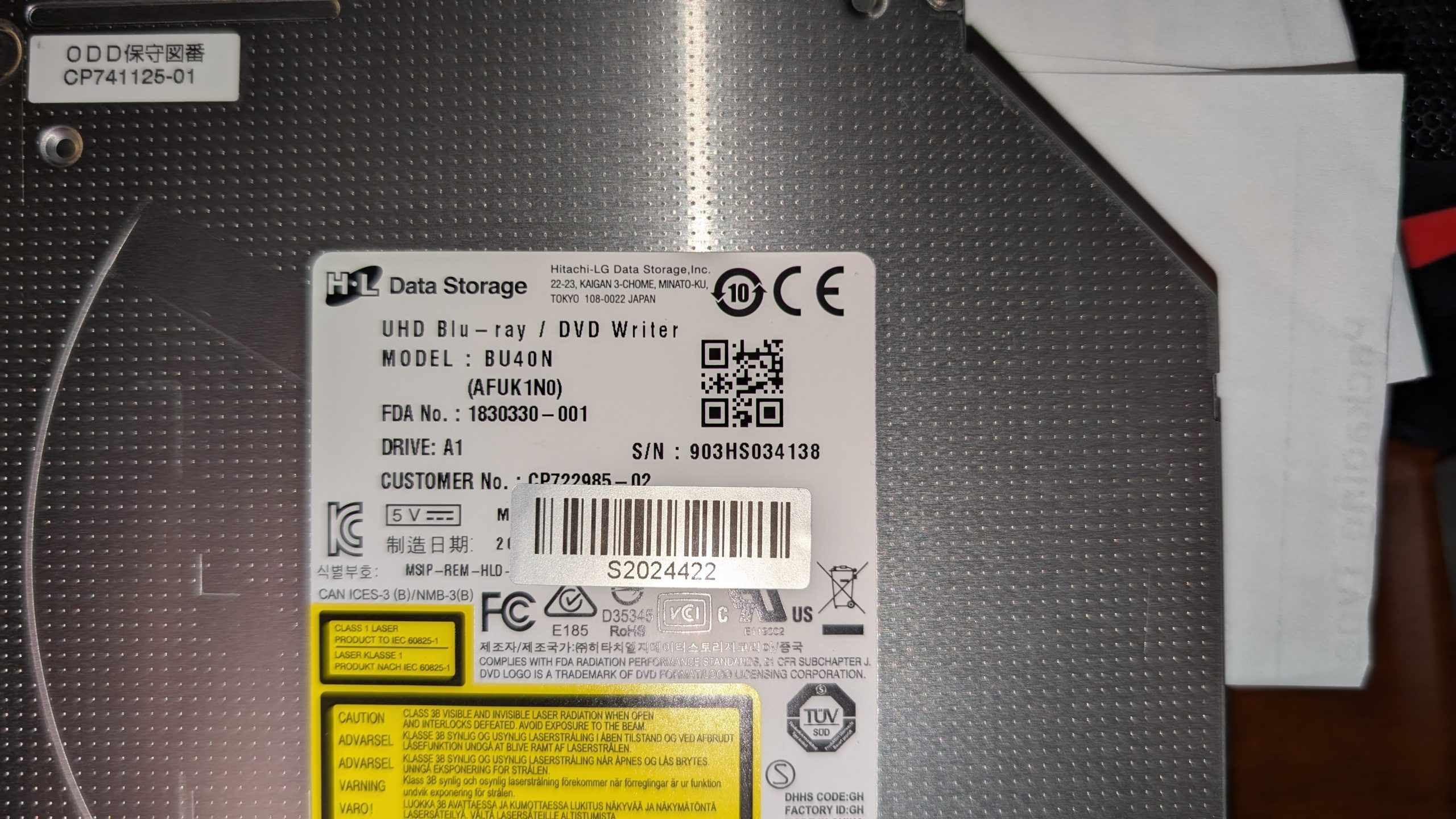
- When I tested it directly with a sata to usb 3 cable it worked fine #1 to flash the BU40N, and additionally to rip a 3gb video from a Blu-ray disc.
- In retrospect I should have purchashed a cable that also provided power. It wasn’t an issue for this drive, but it would have let me using it with drives in the future that required power, as it would be the same price.
- Open here and search for “List below is for past refence and if it becomes relevant in the future for now any USB devices that works with optical drives should be able to flash them: USB enclosures/sata adapters that work with optical drives and flashing” because it recommends
- In retrospect I should have purchashed a cable that also provided power. It wasn’t an issue for this drive, but it would have let me using it with drives in the future that required power, as it would be the same price.
- When I put the drive in this enclosure it ripped at the same speed as the sata to usb 3. That is a test-PASS for me. This enclosure is also used in this video which demonstrates that it works well for two people. Asthetically I like it versus the plain flat top enclosures and even worse the arc’ing tops.
Conclusion
Although it required learning and patience it went stunningly well.
Sanjiv, the MakeMKV forum, the LibreDrive team, and makeMKV made whole process just so easy.
Report back on how it went for you.
It is a blast getting the most out of this drive especially considering that most of the other drives are unobtanium at this point!
Be well!